Forms and documents: sign-up questions, policies and indemnities
Ask new clients your questions when they sign up, book or join, with photos and files. Share your policies, and have parents accept an indemnity for each child.
Ask new clients what you need to know when they sign up, book or join: their level, a medical note, a photo. Share your policies, and have parents accept an indemnity for each child before they book. Switch on Forms and documents in Settings › Customise: it adds Forms to Clients, and Documents to CRM (or to Messages, without the CRM).
1. Make a form
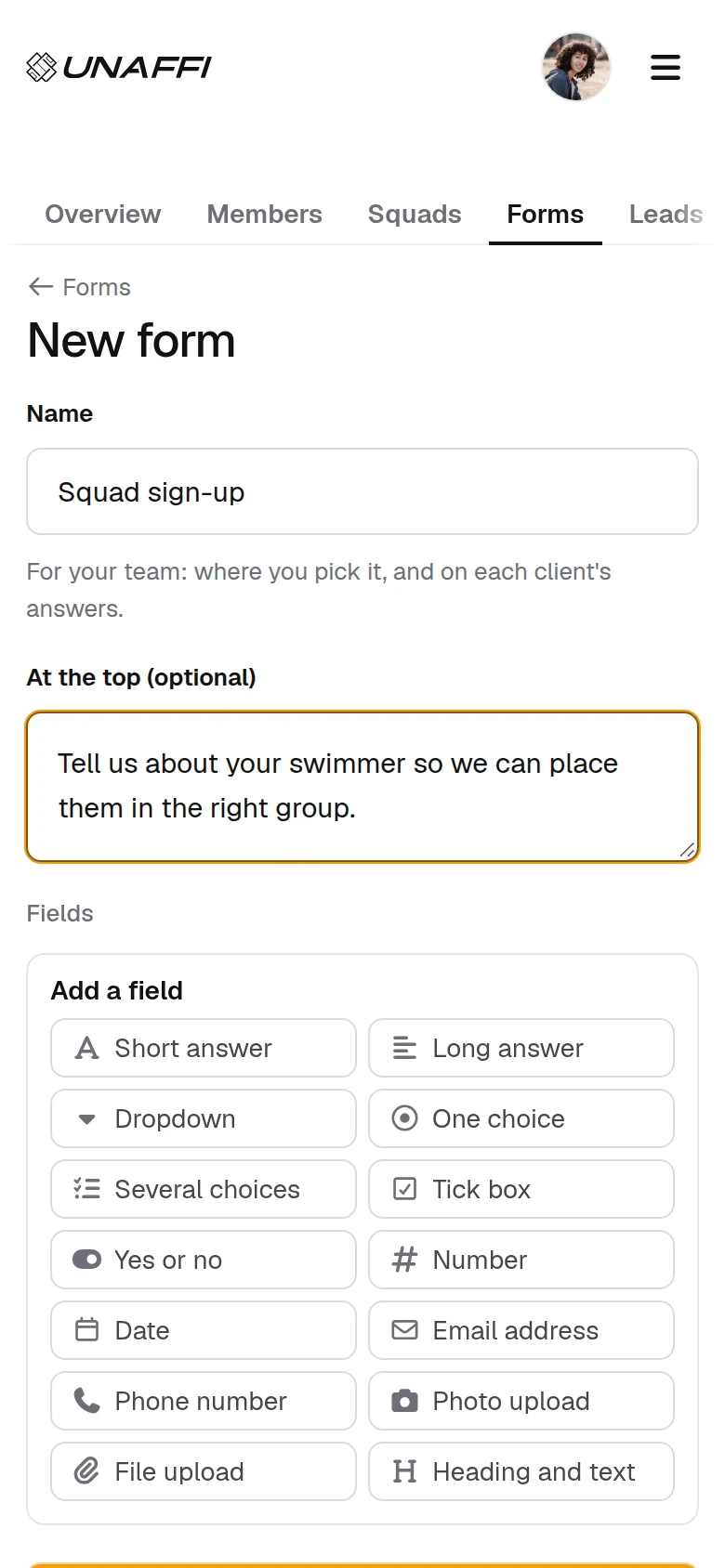
Under Clients › Forms, press New. Give it a name and, if you like, a few lines at its top. Then add up to 50 fields:
- A short or long answer, a number, a date, an email address or a phone number.
- A dropdown, one choice or several choices, from options you list.
- A tick box, or a yes or no.
- A photo or file upload, up to 5 files of 25 MB each.
- A heading with some text, to split it into parts.
Each field has its question, a line under it if you need one, and whether it must be answered. Move fields up and down, and press Preview to see it as people will. Owners and admins make forms, and one form can be used in several places.
2. Become a client, from your page
In Settings › Page, switch on Become a client, and pick your form under Form, or None for only their details. People then find a Become a client button on your page, in your own words if you've changed them in Settings › Customise. They say who it's for (themselves, or their child under 18 with them as the parent or guardian), give their contact details and answer your questions.
What they send waits under Clients › Forms › From your page. Add each one as a new client, or to a client you have already (UNAFFI suggests who they may be), or delete it.
3. A form for each person booking or joining
Pick a form under Form in a public session's booking settings, and each person booked fills it in. On a membership, each person joining from your page fills it in. A facility for hire can ask each hirer too. New form… in the list makes one there and then. See taking bookings online.
4. Answers, on each client's page
A client's answers are on their Forms tab, newest first, each with where it came from (your page, a booking or a membership), the questions as they were asked, and any photos and files. Changing a form later never changes answers already given. A coach sees the answers of the clients they coach.
5. Documents
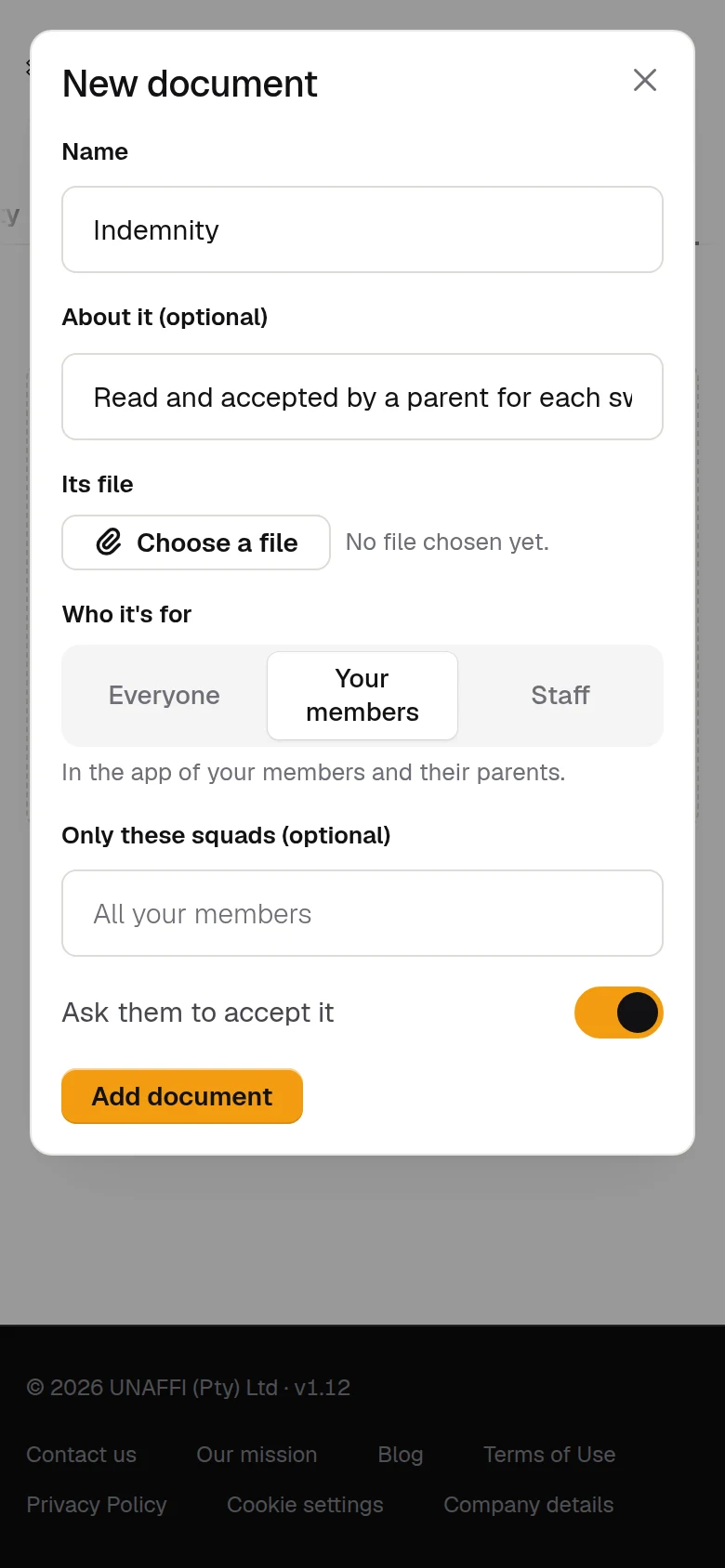
Under Documents, add your policies, a code of conduct or an indemnity: a PDF, a Word document or a photo, with a name and a line about it. Owners and admins add them, and everyone on your staff can read them. Choose who each one is for:
- Everyone: on your page's Documents tab, and in your clients' UNAFFI accounts.
- Your clients: in the UNAFFI accounts of your clients and their parents, or only some groups'.
- Staff: in your workspace only.
6. Ask them to accept it
Switch on Ask them to accept it, for an indemnity, say. It's accepted for each person: by them, or by a parent for each child. They accept it in their UNAFFI account, under Me › Documents, or as they book or join. Under Documents they accept first, pick up to 5 for a session, membership or facility, and whoever books ticks each one for everyone they bring.
The document then shows how many have accepted it, like "8 of 12 accepted". Tap that to see who accepted it, by whom and when, and who hasn't yet. With the CRM on, press Email those who haven't to write them a campaign. A new file asks everyone to accept it again.
Questions
Can parents accept an indemnity for each child?
Yes. Add it under Documents and switch on Ask them to accept it. A parent accepts it for each child in their UNAFFI account, or ticks it as they book or join, and you see who accepted it, by whom and when.
What happens to answers when I change a form?
Nothing: answers keep the questions as they were asked. Wherever the form is used asks its new questions from then on.
Can people upload photos and files?
Yes. A photo upload takes photos, and a file upload takes photos and documents, up to 5 a field and 25 MB each. They count towards your plan's storage.
What happens when I upload a new version of a document?
Everyone it's for is asked to accept it again. Their acceptances of the version before are kept.
Do forms and documents cost extra?
No. Like every feature, they work on every plan, Free too. Switch on Forms and documents in Settings › Customise.